How do you keep a renovation on schedule when one crew runs late?
Designing and shipping a booking website and a multi-crew, multi-day scheduler for a renovation studio in one month
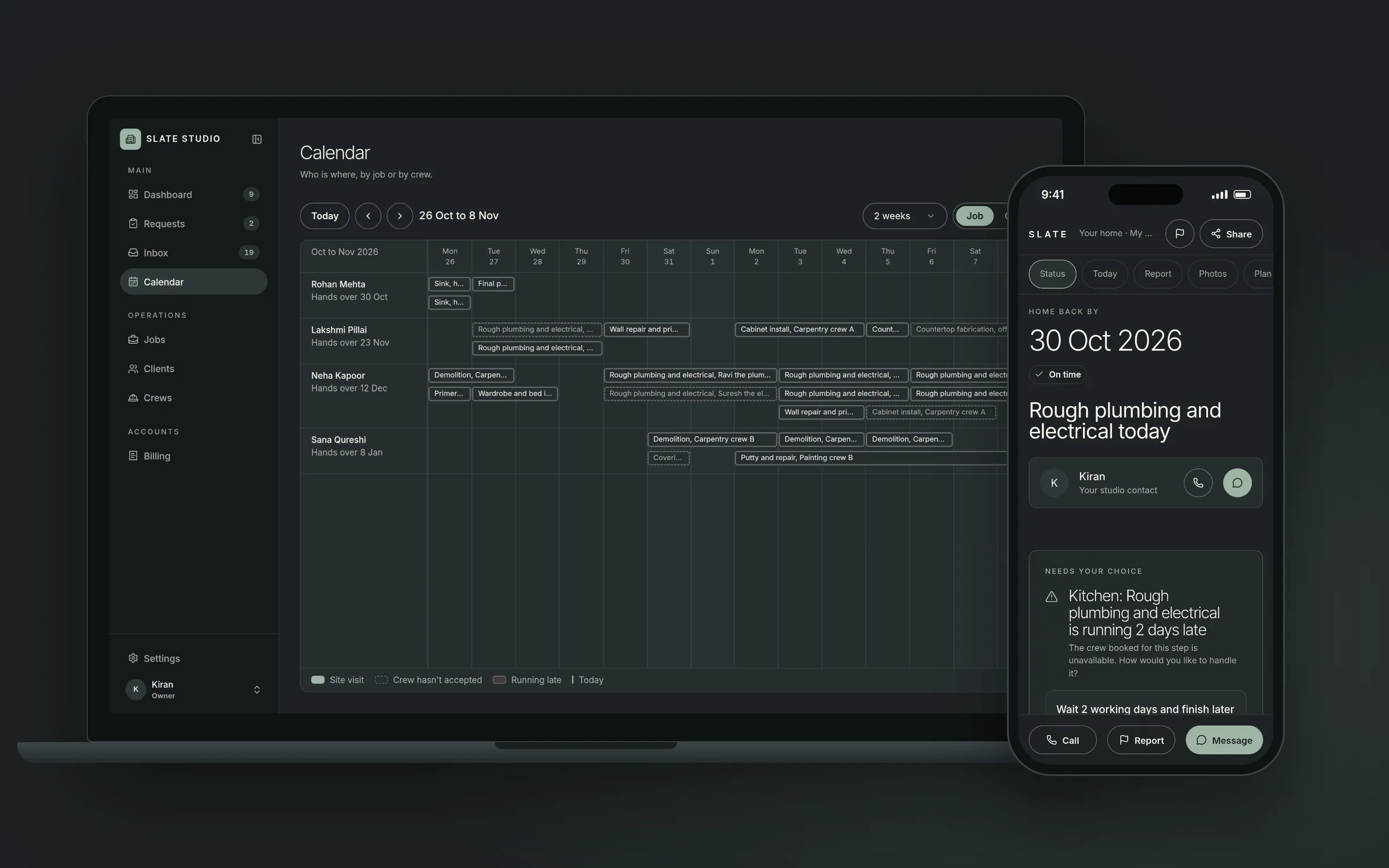
The real question
A family renovating their home asks two things, again and again: who is coming to my house tomorrow, and when do I get my kitchen back? At most studios nobody can answer either with confidence, because the schedule lives in a notebook and in the owner's head.
Slate Studio renovates kitchens, bathrooms and full homes in Hyderabad. The team came to us with two asks: a website that turns visitors into booked jobs, and software to run those jobs once they are booked. I led the research, the product design and the build, and we shipped the whole thing in a month.
How a job actually ran
Before designing anything, I mapped one kitchen from the first enquiry to handover with the Slate team. A kitchen is ten steps done by six trades, each waiting on the one before it: demolition, plumber and electrician, wall repair, cabinets, countertop measure, countertop cut at the workshop, countertop fit, backsplash tiles, fittings, final paint. A full home multiplies that by every room.
Every job had its own WhatsApp group. Crews were chased by phone. When the plumber needed two more days, every date after that was wrong, and nobody updated the plan. The family living in the house found out when the next crew didn't turn up.
What the research found
I talked to the four people in every job, then looked at what the wider numbers say.
- The owner was running the schedule from memory. "I can run five homes. I cannot run five WhatsApp groups and a notebook." Delay news reached them late, often from the homeowner.
- The site lead heard about problems last. "Tell me who is coming tomorrow and whether the tiles have reached." No-shows came from the family, not the system.
- The homeowner wanted numbers before a conversation. "Appa will not say yes until he sees the numbers on paper." Often the person booking was booking for their parents and had to show the plan to someone else.
- Crews would not use an app. "Send me the address and the date. If the plumber has not finished, I am not coming." Crews work for two or three studios and live on WhatsApp.
The wider data said the same. Crew delays were the top project challenge for 27.7% of builders in a survey of 8,462, and 46% of homeowners reported significant delays on their renovation. Asked what would help most, 44% of homeowners said better schedule tracking and 35% said clearer communication. And the builder software that exists assumes an office person drags every bar on a Gantt chart by hand. The homeowner only sees the result, usually after it has changed.
The reframe
The brief said website and scheduling software, two projects. I treated it as one. The website promises a price and dates. If those dates don't come from the same schedule the studio uses to run the work, the website is promising something the studio can't keep.
So the product became one schedule, and everyone sees their part of it. The research turned into four rules, and every screen had to follow them:
- One schedule, everyone sees their part. The website, the studio app and the crew link all read the same plan. Nobody keeps a second copy.
- A price first, a call later. The homeowner gets a price range and estimated dates before speaking to anyone.
- Links, not apps. Homeowners and crews get a link on WhatsApp. Nothing to install, no password.
- When something slips, the homeowner decides. A delay is never a silently moved date. It becomes a choice, the same day.
Designing for the family
The first question every visitor has is "how much, and how long?", so the landing page answers it on the first screen. Pick rooms and a finish, Essential, Signature or Bespoke, and the starting price updates as you pick. Every room type shows its starting price and how long it takes. Past work shows planned days next to actual days, because that is the promise the studio is selling.
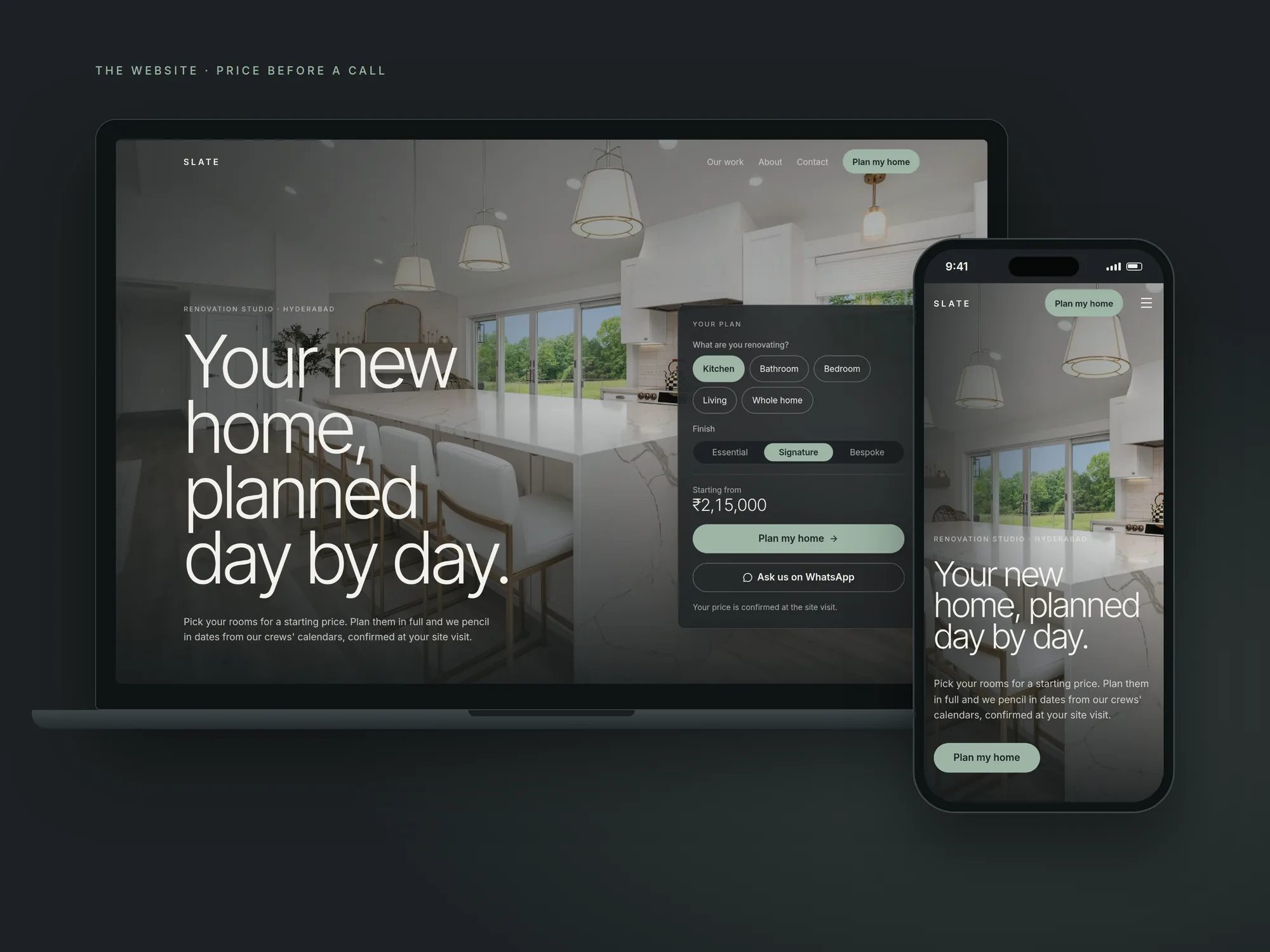 The website, a price before a call
Booking is six short steps: rooms, details, finish, your dates, your plan, site visit. A plan panel stays on screen the whole way, so the price and the finish date never disappear. The "Your plan" step is where the schedule first shows up for the family: one row per room, day by day, with the days the kitchen is out, when the water is off, when it is noisy, and when someone must be home. If the family is staying in the house, it says which bathroom stays working.
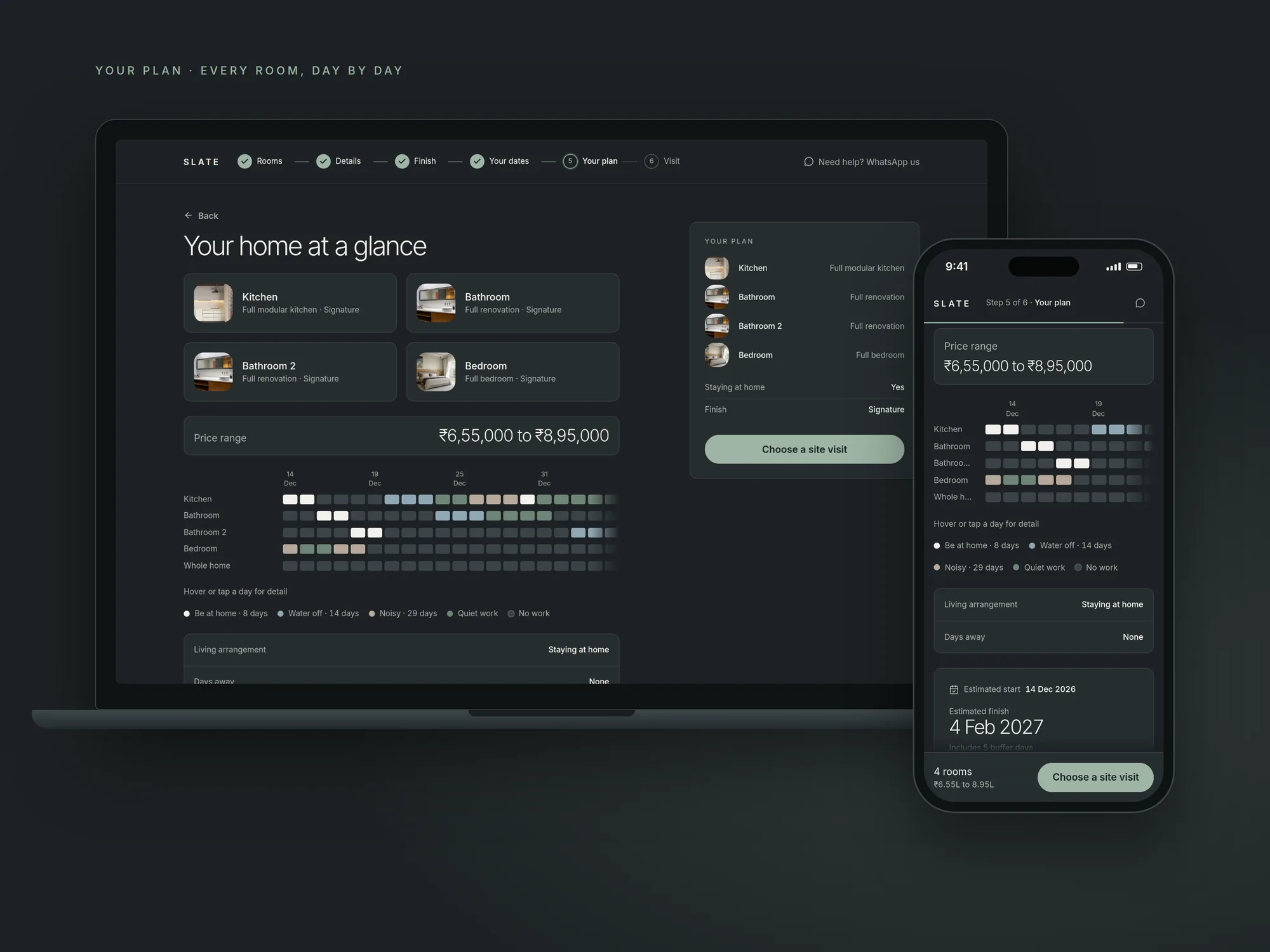 Your plan, every room, day by day
After booking, the family gets one link they can share with whoever needs to see it. It follows the job through every stage, visit, quote, booked, on site, handover, and the headline is always the one thing they care about: when the home is back.
Designing for the studio
The studio app is where the owner, the manager and the site lead work all day, so it opens on what needs them today: homes on site against the studio's limit, crews who haven't replied, and today's visits.
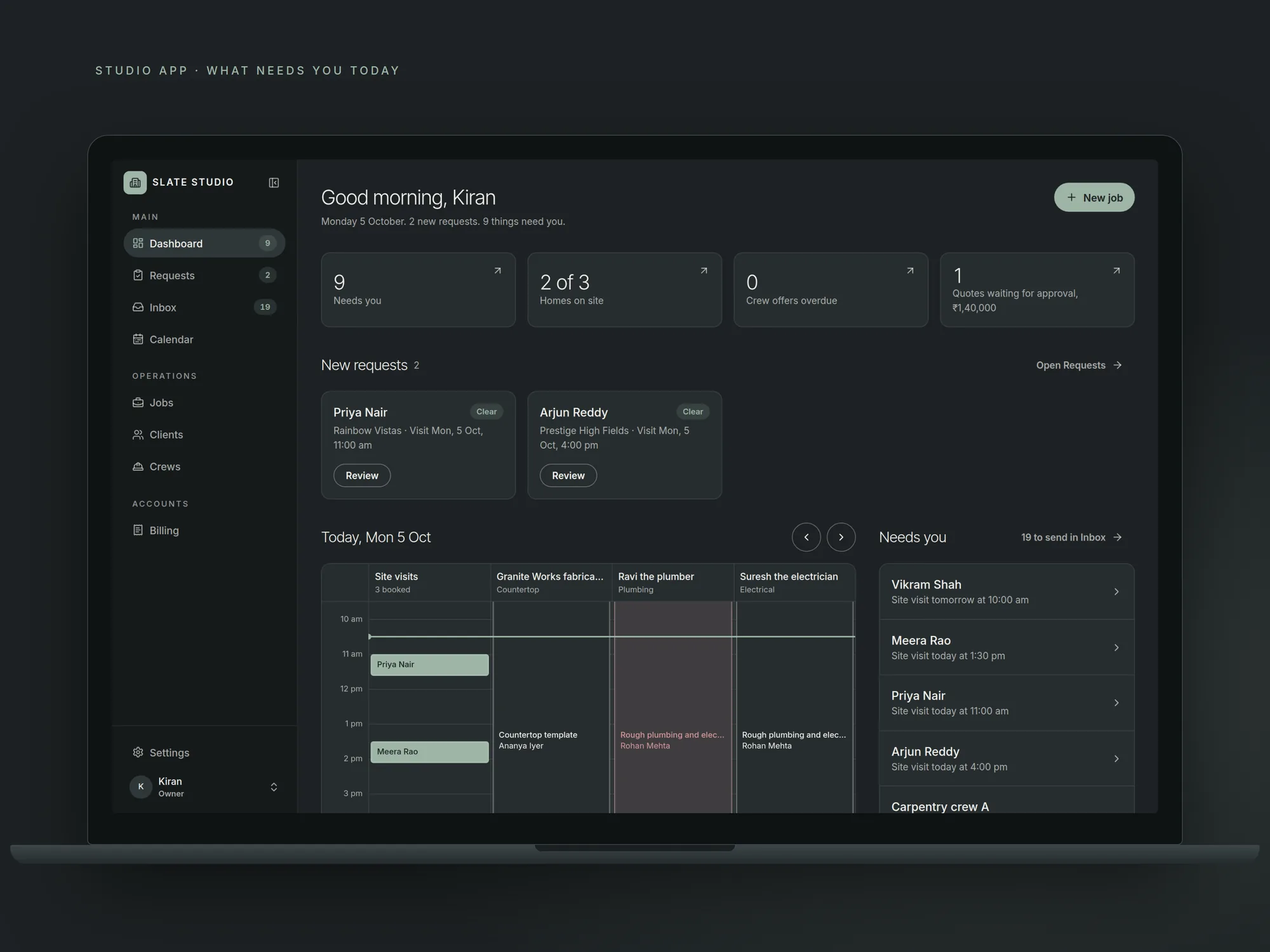 The studio app opens on what needs you today
New requests come with the checks done before anyone says yes: does the budget fit, is the visit slot free, is there room in the diary, and are any crews double-booked. With no problems, the visit confirms itself. The site lead sees the day's crews and visits, and no money.
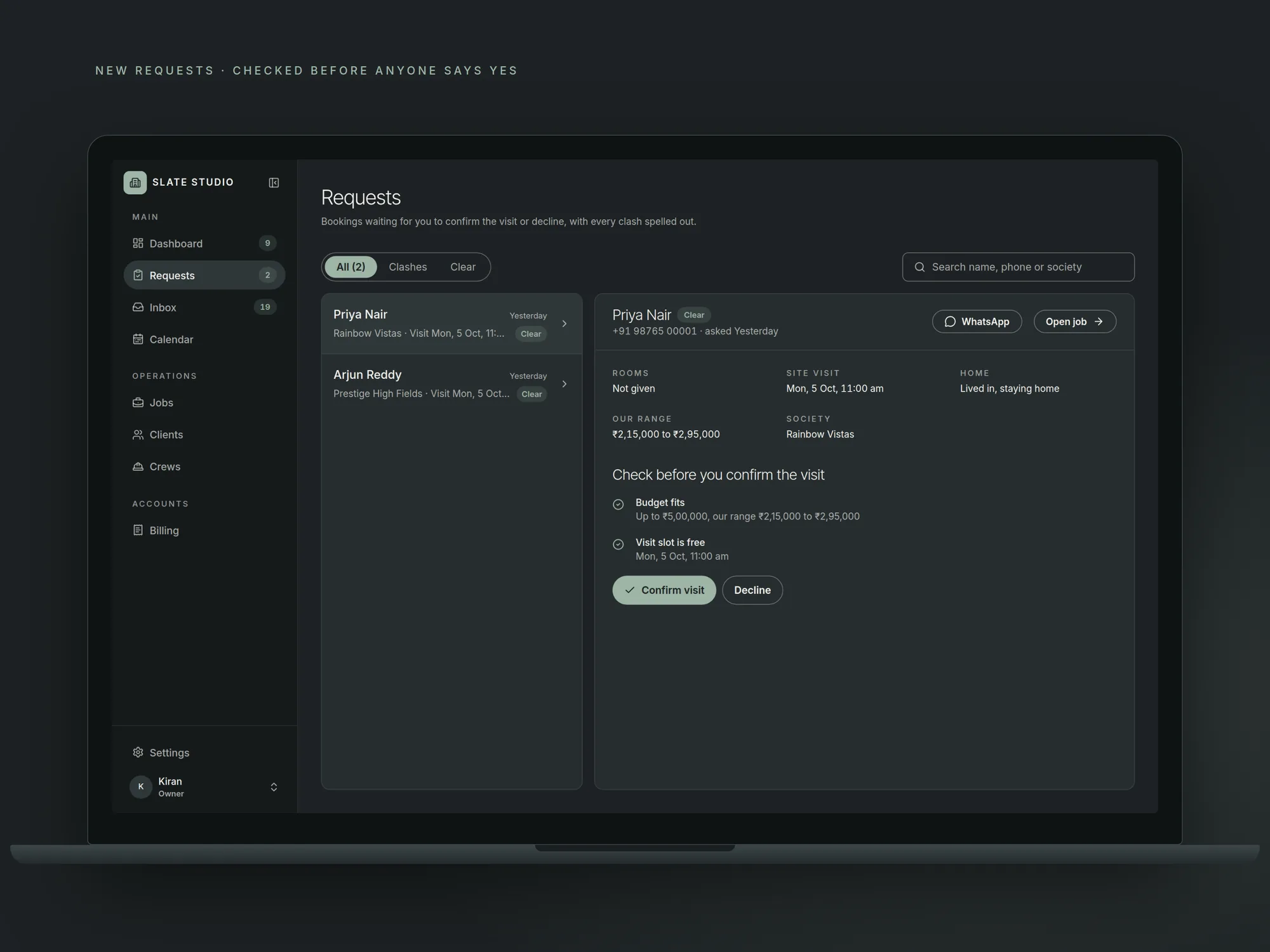 New requests, checked before anyone says yes
The scheduler
This is the part that holds everything together. It plans every crew, across every room and every day, and keeps the plan true when something changes.
The whole home is one job. Every room follows the same order of work: demolition, plumbing and wiring, waterproofing, ceilings, tiles and floors, wall repair, carpentry, countertops and glass, fittings, final paint, cleaning. Crews move through the house the way a real site runs. If the family is living there, two bathrooms are never out on the same day.
It picks the crew for every step. For each step it takes the first crew of that trade who is free on every day the step needs. If nobody is free, the step moves a day and it tries again. The plumber and the electrician work side by side where they can.
It knows the waits. Cabinets take 20 working days to arrive for a Signature kitchen. Countertops are cut at the workshop for 7 days. Glass is measured after tiling. Sundays are off, and a small buffer is added at the end.
It shares crews across homes. One carpenter can work on three homes in a month without being double-booked. Every confirmed day blocks that crew for the next booking, and the studio never takes on more homes than it can run.
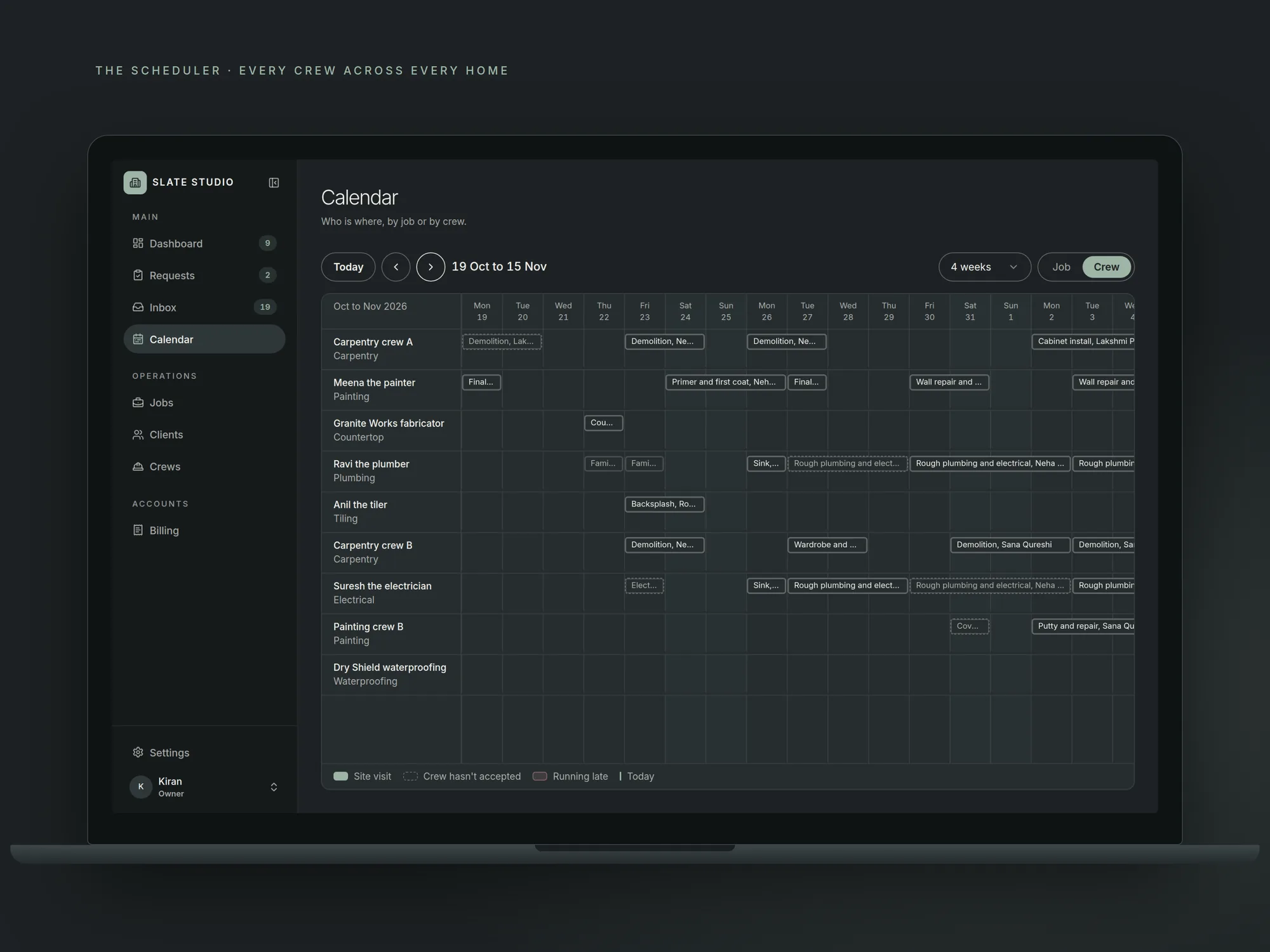 Every crew across every home, planned automatically
Plans stay true. A booking that hasn't paid its deposit lets go of its crews 48 hours after the site visit. When a job is confirmed, it is planned again from today, so no crew is ever offered a date that has already passed.
In numbers: one kitchen is 10 steps, 6 crews and 23 working days. A 2 BHK is 8 rooms and 44 crew bookings across 7 trades, planned in one go. A 3 BHK is 60 crew bookings over about 13 weeks.
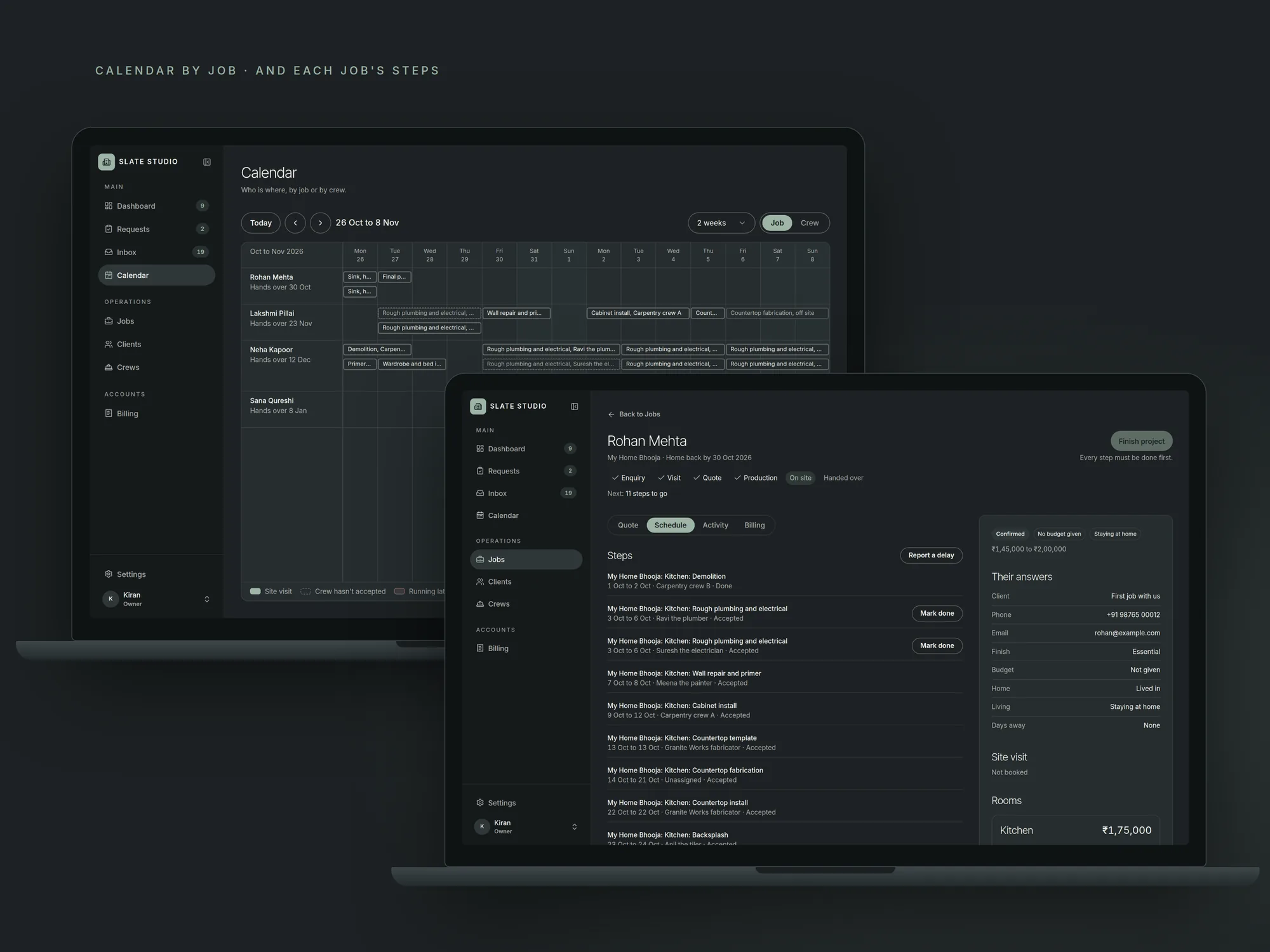 By job, and each job's steps with their crews
When something slips
The state that matters in renovation is the one that goes wrong, so I designed the delay before the happy path. This is the moment the whole system was built around.
The plumber taps "I need 2 more days" on their phone. The family gets a message the same day with three options, each showing the new finish date and the cost: wait 2 days at no extra cost, bring in the backup plumber for a set price and keep the date, or talk to the studio first. The family picks. Every step after it moves, and the studio sees the choice.
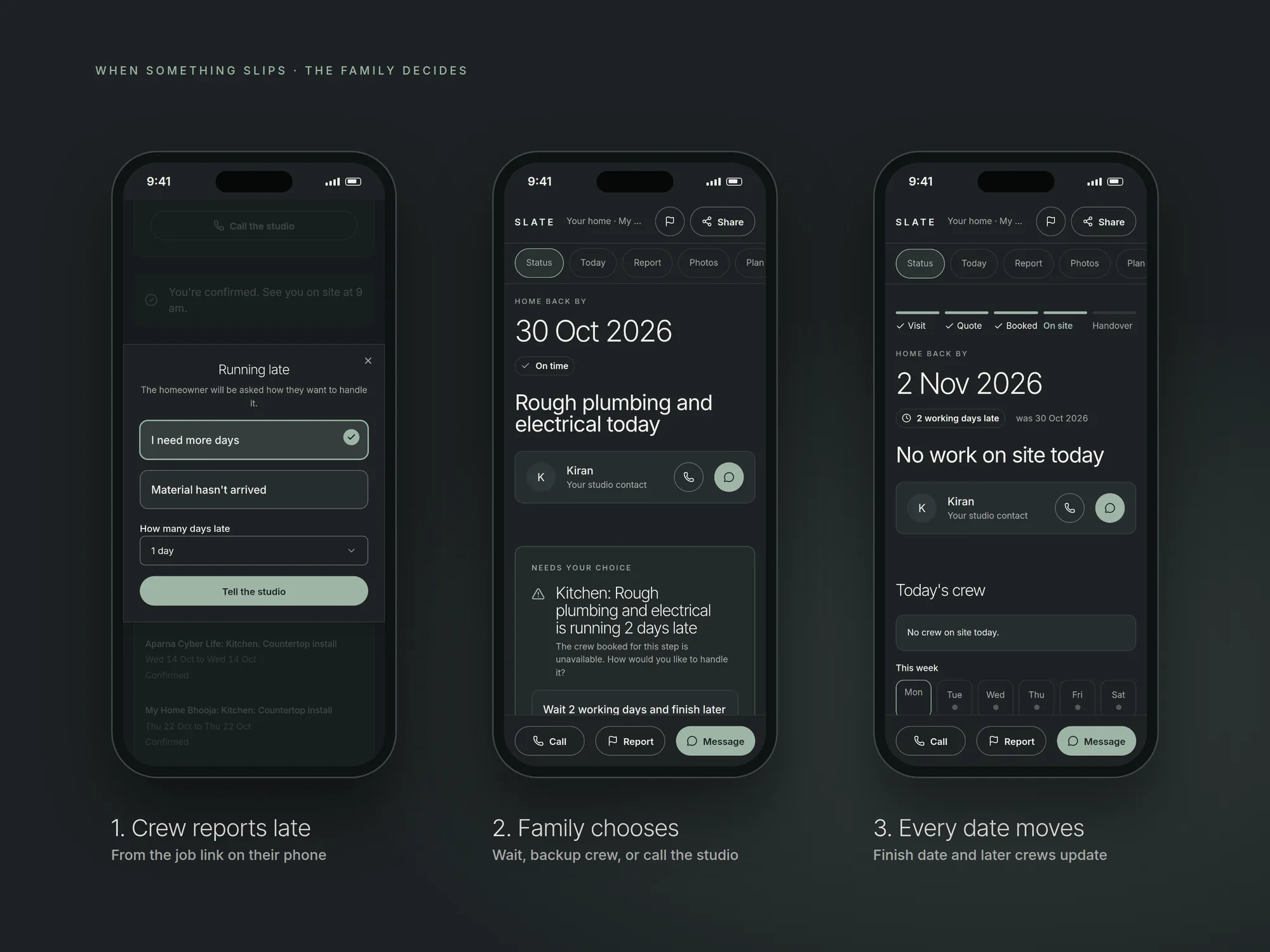 A late crew becomes a choice, the same day
If a crew says no to a job, the next free crew of that trade is asked automatically, and a crew that said no is never asked again.
Crews get the same plan through a link on WhatsApp: the trade, room, address, dates and start time. They accept or say no, mark a step done, add a photo the family sees, or report a delay. Nothing to install, nothing to learn.
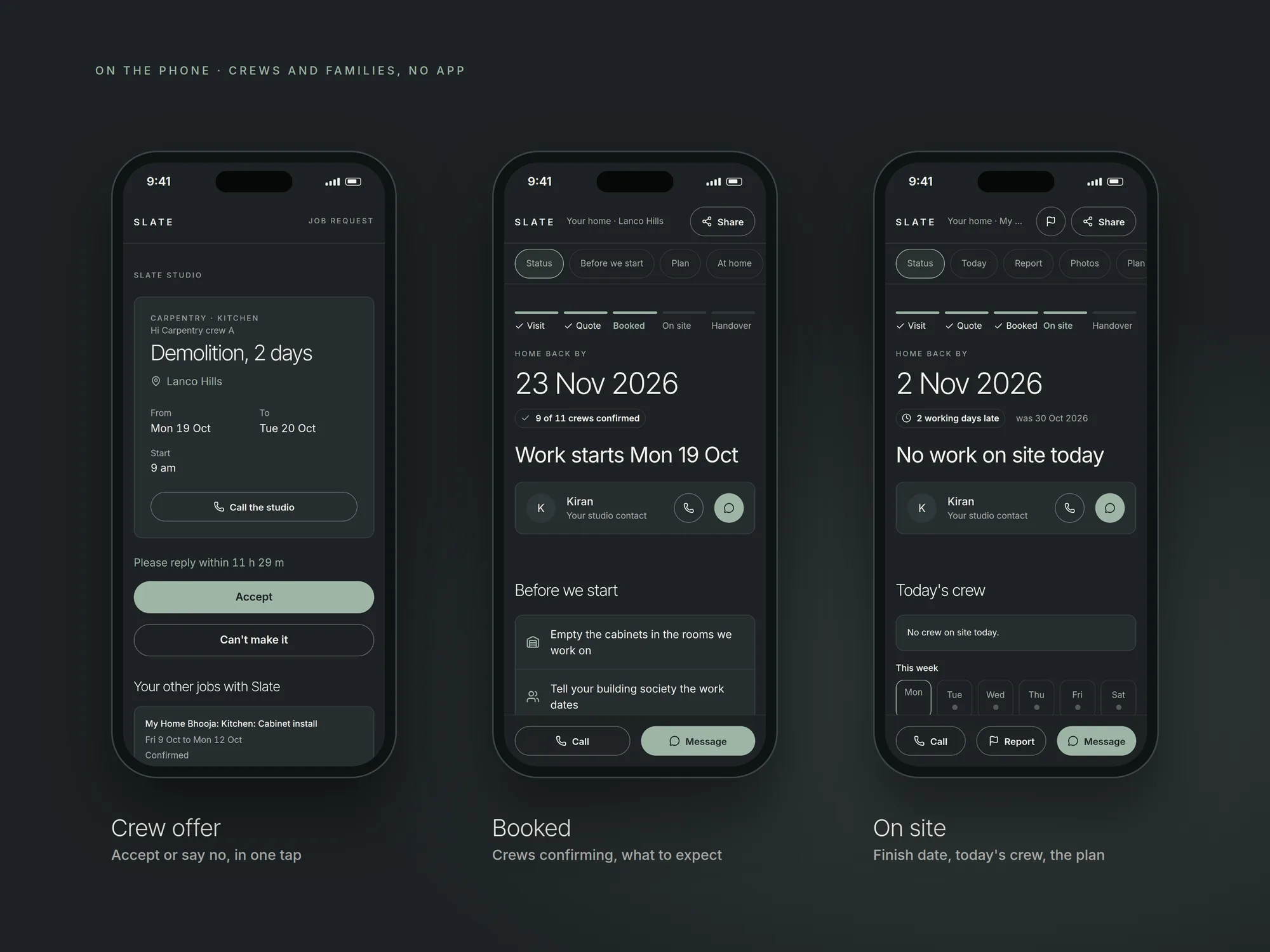 Crews and families on the phone, no app
What I explored and killed
Room-by-room plans. Planning each room on its own is much simpler to build. But crews don't work that way, and a family can't live with every room torn apart at once. One order of work across the whole home made the scheduler far harder, and it made the plan match how a real site runs.
A crew app. An app would have given us notifications and profiles. But crews work for two or three studios and won't install software for each. A link on WhatsApp gets the job accepted. What we gave up: crews don't manage their own days off, the studio adds them.
Moving the date and telling the family later. That is what most tools do. I put the choice in the family's hands instead, with the cost of each option. It means the studio shows its delays openly, and that turned out to be the point: trust comes from being told early.
An exact quote online. It would be wrong for most homes, because every home is different. A range with estimated dates gets the visitor to book a site visit, and the quote is confirmed after the studio has seen the home.
Messages that send themselves. Every WhatsApp message is written by the system and sent by someone at the studio. Nothing goes out that the studio hasn't seen, and it costs nothing to run.
The hardest part
The hardest problem was not drawing the calendar. It was deciding what each person needs from the same plan. The schedule holds every step, crew, wait, room and day for every home. Shown to everyone, it helps no one.
So each person gets the question they actually ask:
- The family: when is my home back, and what happens at home this week?
- The crew: where, when, and is the crew before me done?
- The site lead: who is coming today, and who is late?
- The owner: what needs me, and can we take one more home?
One plan underneath, four reads on top.
Design
Two looks for two jobs. The family's side, the website, booking, the homeowner page and the crew links, is dark, calm and photo-led, in slate and bone with a sage accent. It should feel like a studio, not software. The studio app is charcoal and sage in dark mode and ivory in light, dense enough for a full day of work.
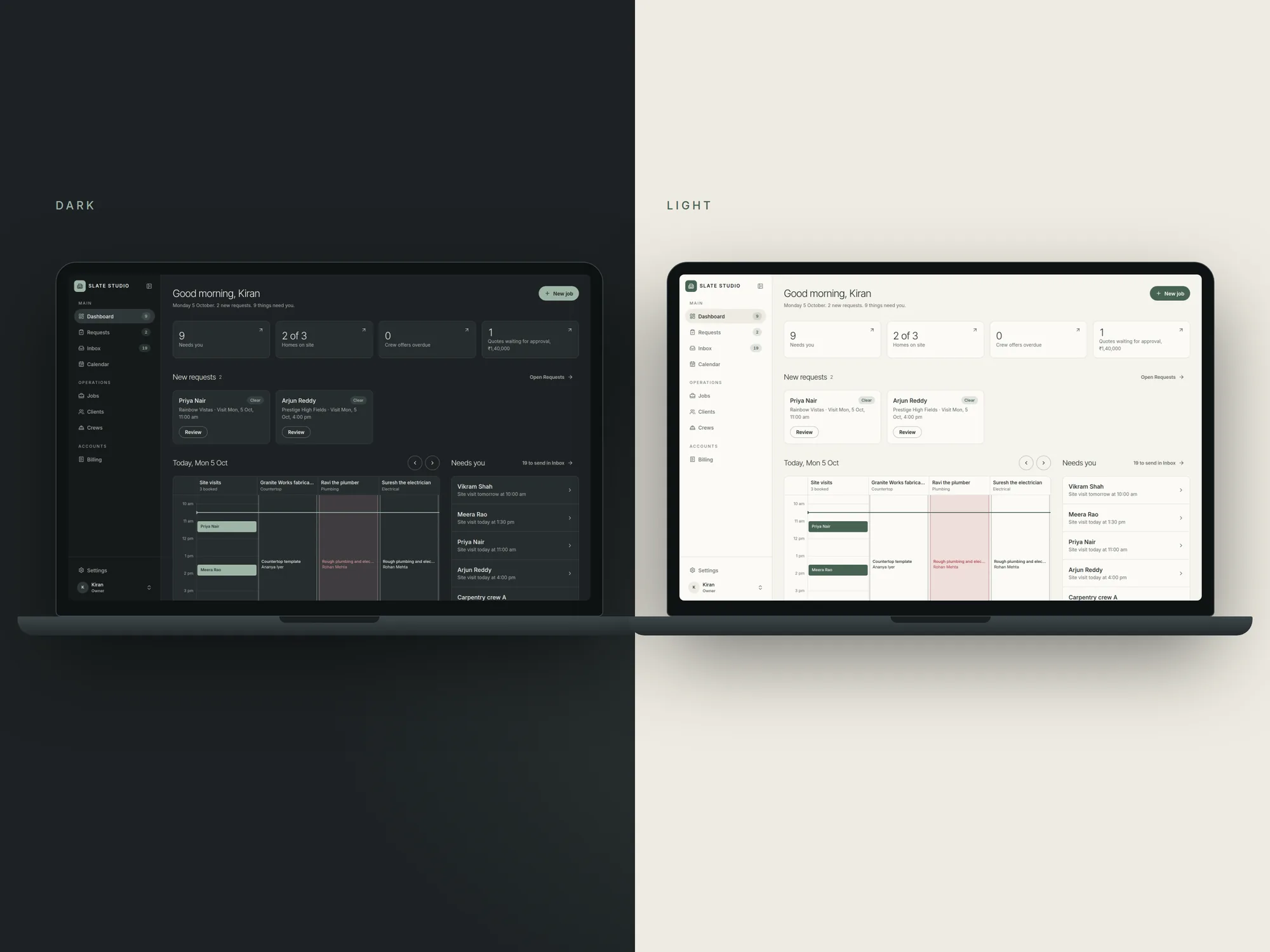 The studio app in dark and light
Each trade has its own colour, so a calendar full of crews reads at a glance. Type is Inter Tight for headings and Inter for everything else, with even-width numbers for prices and dates. Every colour pair was checked for contrast, and everything works on a phone first, because that is where families and crews are.
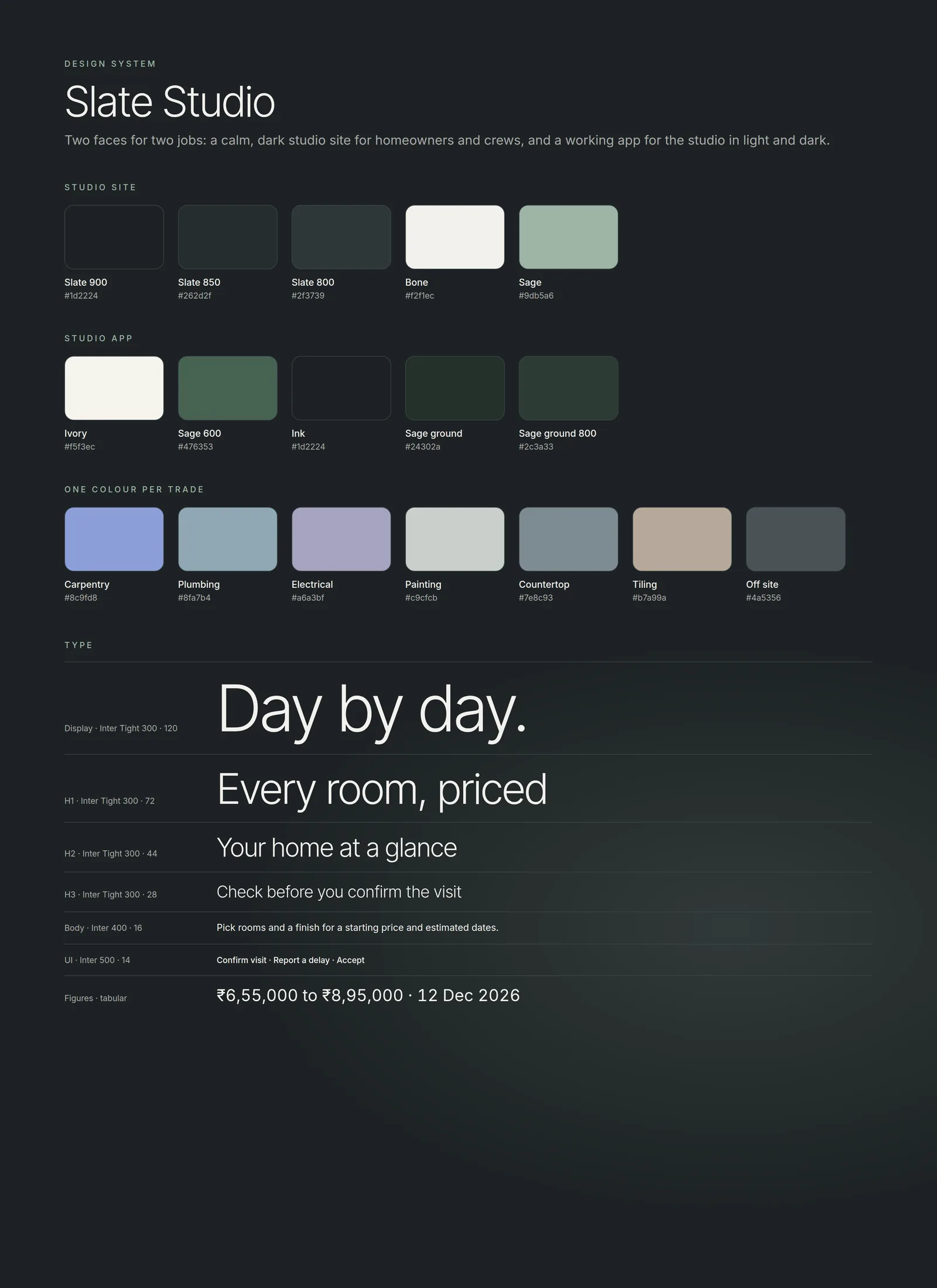 Colour and type
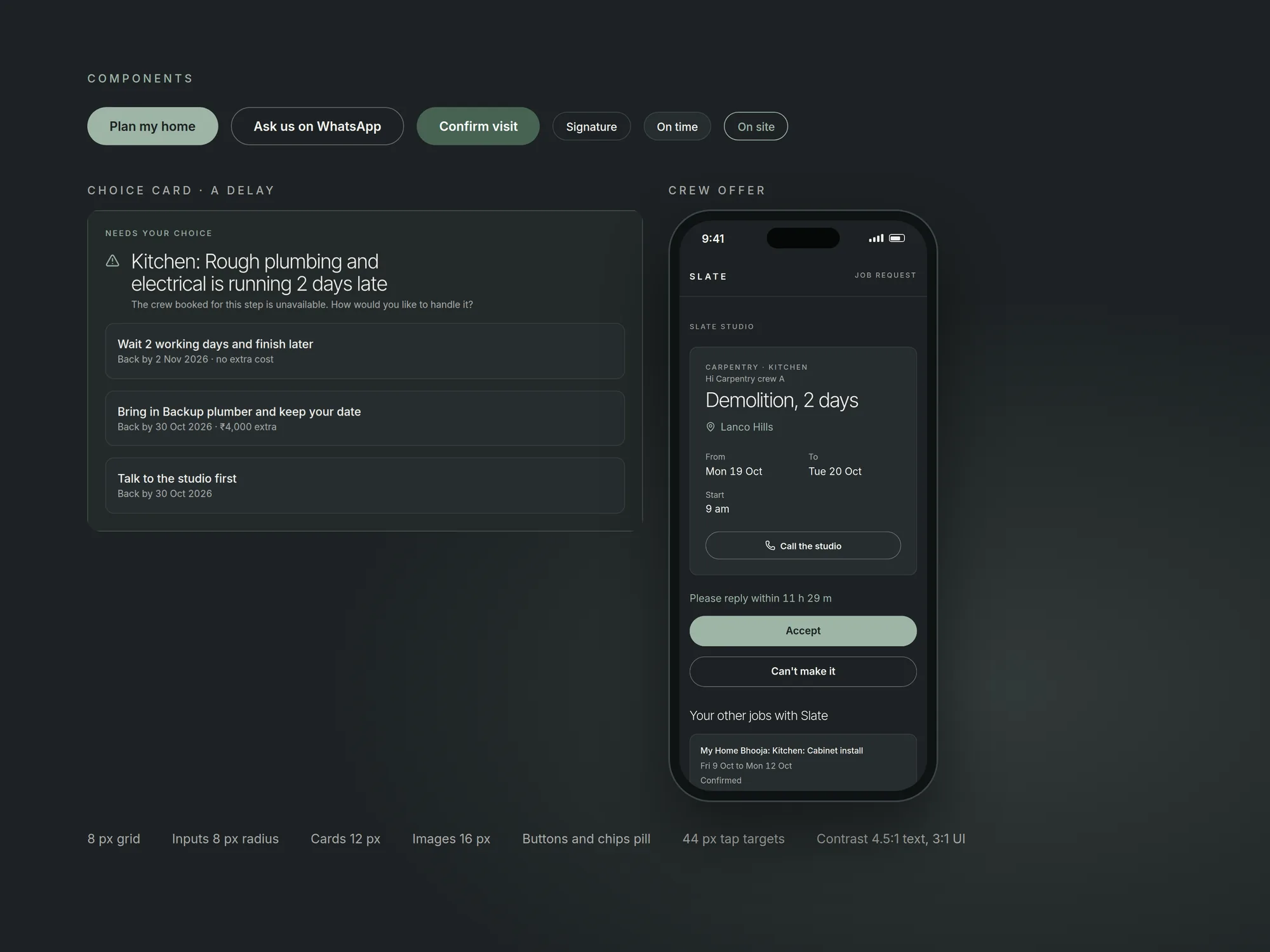 Components
Outcome
This shipped in a month, so there are no long-run numbers yet. What changed from the first week:
- The owner went from five WhatsApp groups and a notebook to one calendar and one list of what needs them today.
- The site lead sees who is coming and who is late, instead of hearing it from the family.
- The family gets a price and a plan in minutes, and a choice when something slips.
- The crews get exact dates on a link, and nothing to install.
The honest version: the system doesn't make crews faster. It makes the same delays visible on the day they happen, with an owner and a choice attached.
Reflection
I went in thinking the website was the product. The research turned it into a scheduling problem. The website is just the first place the schedule shows up, and a page that promises dates is only as honest as the system that keeps them. That changed how I scope work for small businesses. I spend less time asking "what should the page say?" and more asking "what has to be true behind it for the page to keep its promise?"
- Reframed a website brief as a scheduling problem, so the dates a homeowner sees online come from the same plan the studio runs the work on
- Mapped one renovation from first enquiry to handover across four people, the owner, the site lead, the family and the crews
- Designed a scheduler that plans every crew across every room and every day, and shares crews across homes without double-booking anyone
- Designed the delay first, a crew reports late from their phone and the family picks wait, backup crew or call the studio, the same day
- Killed a crew app for a WhatsApp link, and an exact online quote for an honest price range
- Designed, built and shipped the whole system in one month, website, booking, homeowner page, studio app and crew links